Document Desk

Ask your contracts and policies, get the page cited

A private assistant that reads your contracts, intake forms and policies and answers with the page it came from. It runs inside your own Microsoft or Google account.

Get a written quote: Document Desk Install
A building taken apart floor by floor, with the one floor where data could leak highlighted.

Can AI answer questions about our contracts privately?

Yes, inside the business accounts you already pay for. Document Desk sets up Microsoft Copilot or Google Gemini to read your contracts, intake forms and policies and answer with the document and page cited, with only the right people able to see each file. The kit is $149 to set it up yourself; the Install starts at $3,500.

Who it's for
Professional offices such as tax, law, insurance and real estate, and any business that signs contracts or handles intake forms and policies.
What you get
Kit: A safe setup guide, 30 prompts for contracts, leases and intake forms, a red-flags checklist, a document map, a 25-question answer check and paste-in instructions for six tools, starting with a 15-minute quick start. Install: We set up Document Desk in your own Microsoft or Google account, organise the documents it reads and test its answers with you.
Price
Kit $149, one time. Install from $3,500, in a written quote.
How long
Kit: download right after checkout. Install: 3–5 weeks.

How it works

Document Desk, step by step

How Document Desk worksYour documents stay in folders in your own company account, and you choose which ones it can read. People ask in plain words, every answer cites the document and page, and a person checks the page before deciding.01Documents in your foldersIn your own account; you choose which02Ask in plain wordsNo file names or clause numbers03Answer cites the pageOr says it can't find it04A person decidesCheck the page, then act
Your documents stay in folders in your own company account, and you choose which ones it can read. People ask in plain words, every answer cites the document and page, and a person checks the page before deciding.

Two ways to get it

Do it yourself, or have us do it

Set it up yourself with the Kit, or have us install it. You buy either one online, without a sales call.

Kit · you set it up

Document Desk Kit

A safe setup guide, 30 prompts for contracts, leases and intake forms, a red-flags checklist, a document map, a 25-question answer check and paste-in instructions for six tools, starting with a 15-minute quick start.

$149one time

What's in the kit

  • Start here

    Your first cited answer in 15 minutes, and how to set it up safely.

    PDF

  • Document prompt pack

    30 prompts for contracts, leases and intake forms, also as a file AI tools read well.

    PDF · AI-ready Markdown

  • Red-flags checklist

    What to check before you trust an answer from a document.

    PDF

  • Document map

    Which documents go in, and which stay out. Opens in Google Docs.

    Word · PDF

  • Answer check log

    25 questions to check its answers against the source.

    Word · PDF

  • Paste-in instructions and builder prompts

    Instructions for six tools, and prompts that set up your document assistant.

    Text to paste

See all 14 files
  • 15-minute quick start (PDF)

    Your first three cited answers from your own documents in 15 minutes.

  • Safe setup guide (PDF)

    Setting it up in a business Microsoft 365 or Google Workspace account: folders, access, settings, what never to upload, and a quarterly check.

  • Document prompt pack (PDF)

    30 prompts for contracts, leases and intake forms that answer with the page cited.

  • Red-flags checklist (PDF)

    What to look for in contracts, leases and intake forms before you sign or rely on them.

  • Document map (Word + PDF)

    List your documents, where each lives, who may see it, how long you keep it and whether it's OK for AI, with a filled-in sample.

  • Answer check log (Word + PDF)

    25 questions you know the answers to, checked against the page each answer cites.

  • AI-ready document prompts (Markdown)

    The starting rule and all 30 prompts as Markdown, to keep in your assistant.

  • Builder prompts (Text)

    Prompts that build your document map, plan your folders and write test questions.

  • ChatGPT project instructions (Text)

    What to paste into a ChatGPT project, and which files to add.

  • Custom GPT instructions (Text)

    Instructions, knowledge files and conversation starters for a custom GPT.

  • Gemini Gem instructions (Text)

    What to paste into a Gemini Gem, and which files to add.

  • Microsoft Copilot instructions (Text)

    What to paste into a Microsoft 365 Copilot agent, with its knowledge files.

  • Website chat instructions (Text)

    Rules for your website chat assistant, written for customers.

  • Phone bot instructions (Text)

    A greeting and spoken rules for your phone answering app.

Plus 15 narrated videos, 17 min in all: 3 quick starts, a 9 min full walkthrough with chapters and 11 "How do I" clips. See the videos

Download right after checkout, and any time later from the link in your email. Start with the 15-minute quick start; the workbooks and templates come with filled-in examples. If a file won't open or something's missing, tell us within 30 days and we fix it or refund you.

Upgrade later: the $149 comes off your Document Desk Install quote within 60 days.

Secure checkout on Stripe. Card, Apple Pay or Google Pay.
Install · we do it for you

Document Desk Install

We set up Document Desk in your own Microsoft or Google account, organise the documents it reads and test its answers with you.

From $3,500

3–5 weeks

Your own tool costs

Priced in writing for your documents and team size. A version that runs on your own hardware in the office is quoted separately.

What's included

  • Set up inside your own Microsoft 365 or Google Workspace account
  • Your contracts, intake forms and policies organised so the right people see the right files
  • Answers that cite the document and page, tested with your team's real questions
  • A written guide and training for your team

What you get at handoff

  • A private client portal: everything we delivered, the test results, short how-to guides, your files and your care plan, behind one link
  • A designed handoff pack (PDF), plus every file in editable Word, which opens in Google Docs
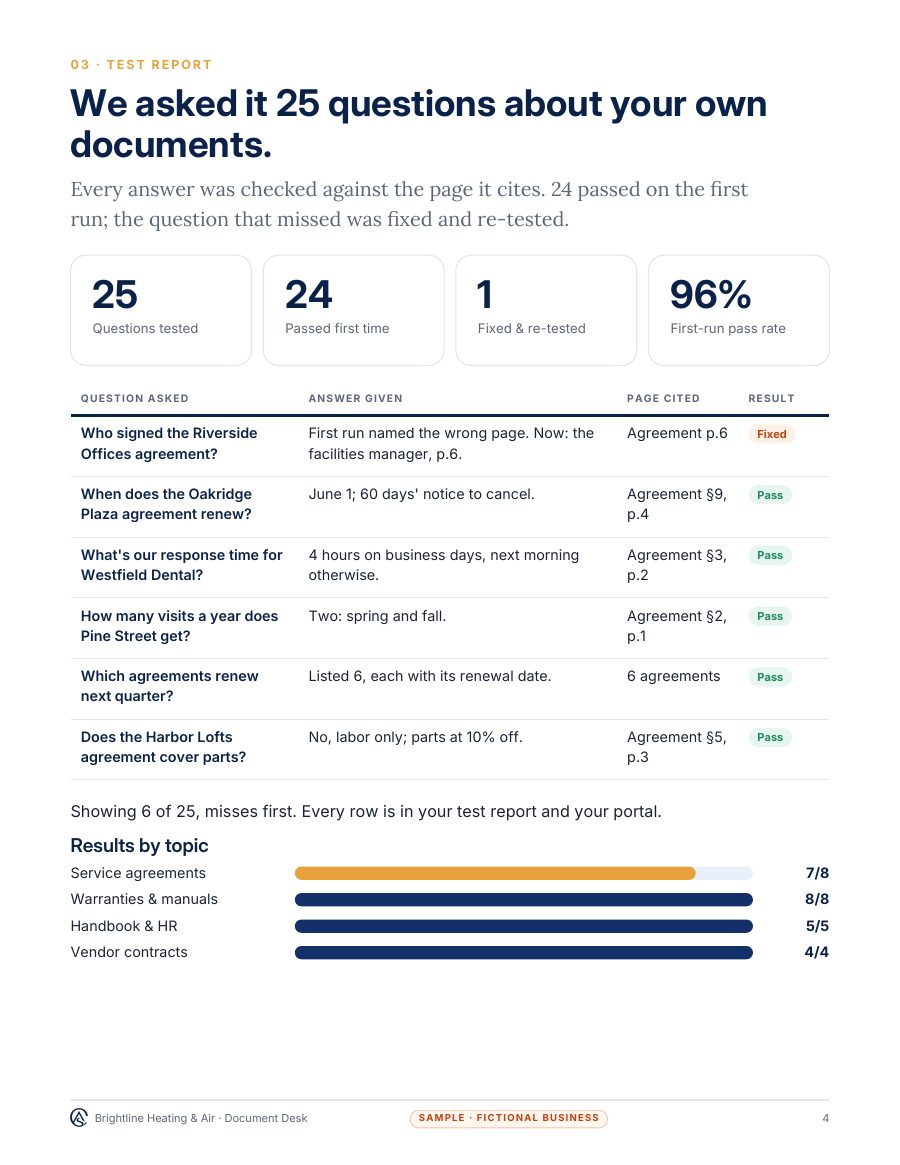
  • 25-question test and data-handling sheet: 25 questions about your own documents, each answer checked against the page it cites, plus a data-handling sheet: what the assistant can read, where it's kept and who can see it.
  • A one-page ownership and access sheet: every account, who owns it, and every file
  • A 30-day results report from your own logs
  • A 10-minute team walkthrough guide, and an "Ask it this" card with 10 starter questions for staff
Get a written quote: Document Desk Install

A fixed price in writing by email before any work starts. Or start with the AI Assessment ($1,500), credited toward your build.

Questions first? Text us or email us.

Before you buy

Your own tool costs

What you pay other providers, in your own accounts, whichever way you buy. None of it is paid to us.

ToolTypical cost
Microsoft 365 Copilot (if you use Microsoft)About $30 per user a month; Copilot Chat is included with Microsoft 365
Google Workspace with Gemini (if you use Google)Included in most Business plans, from about $14 per user a month

Approximate vendor prices as of November 2026; check each provider's current price. These are paid to them, never to us.

See what you get

A sample deliverable

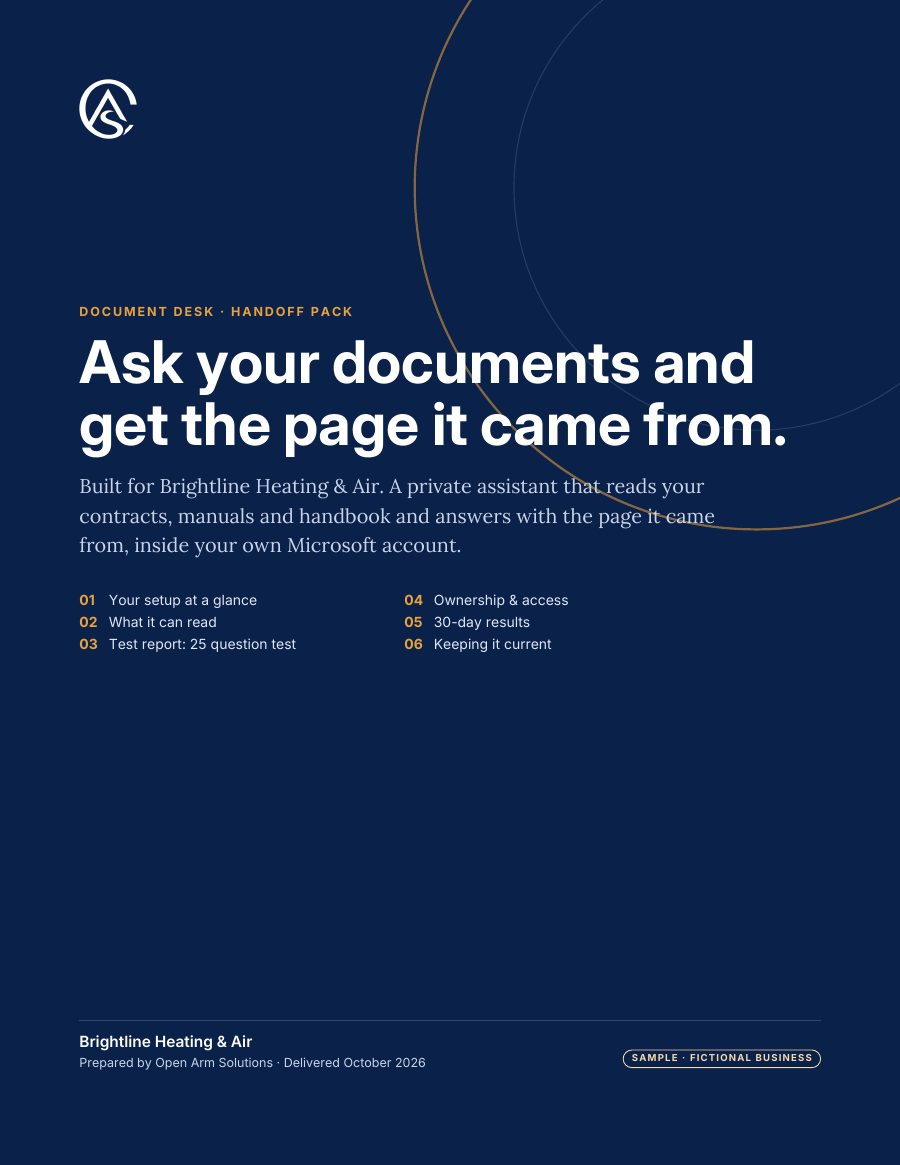
Made for Brightline Heating & Air, a made-up heating and air company, so you can see the format before you buy. Your own pack uses your business, your tools and your results.

Sample · fictional business

  • Sample handoff pack, page 1: cover, for Brightline Heating & Air (fictional)
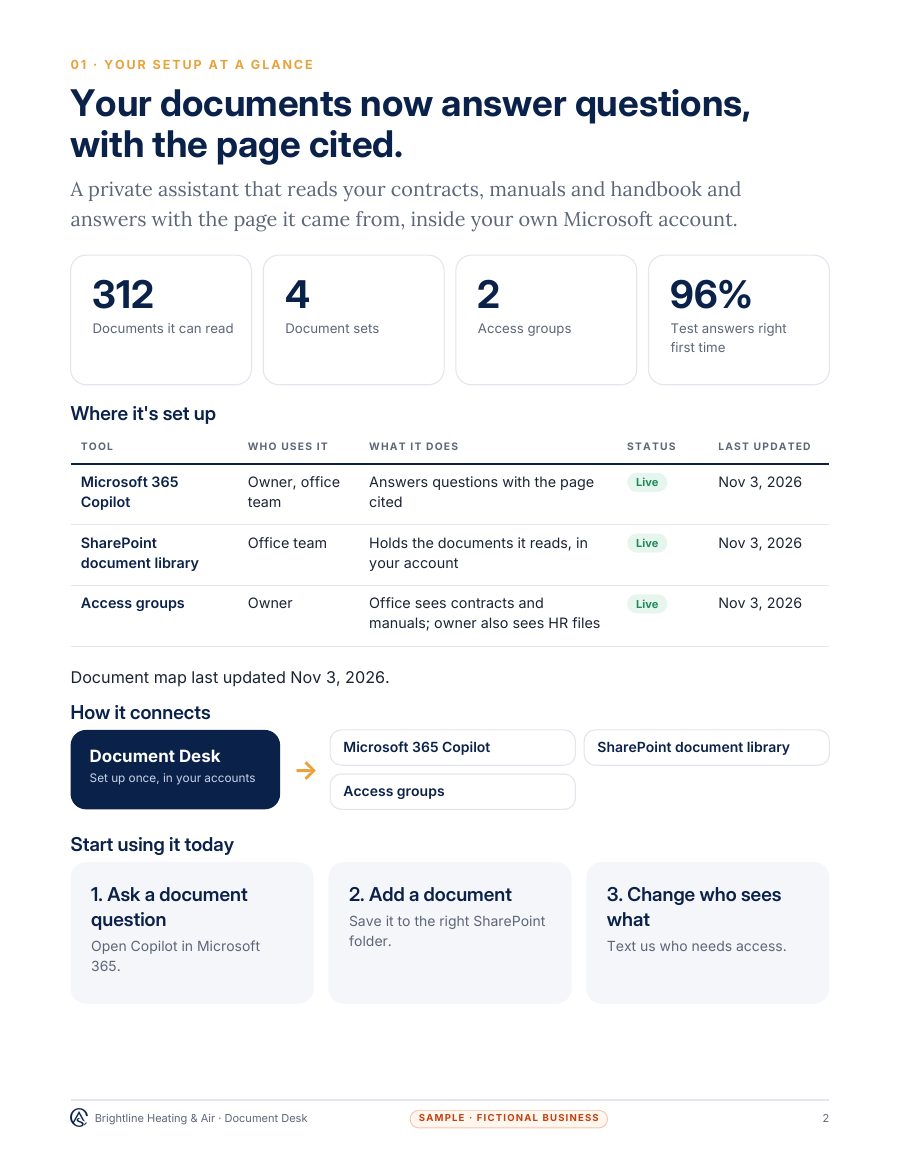
  • Sample handoff pack, page 2: setup at a glance, for Brightline Heating & Air (fictional)
  • Sample handoff pack, page 3: 25-question test and data-handling sheet, for Brightline Heating & Air (fictional)

The proof in every Install: 25 questions about your own documents, each answer checked against the page it cites, plus a data-handling sheet: what the assistant can read, where it's kept and who can see it.

Try it

See how it works

A live demo with a made-up business. Nothing you type is kept.

Live demo

Catch fake invoices before they're paid

Paperwork Autopilot

Pick an invoice or intake form for Coquina Builders. AI reads it into a clean record, then the fraud checks run.

  • Checks the vendor, bank details, repeat invoices and totals
  • Nothing is paid until a person approves
Get this for my business: Paperwork Autopilot

Fitted to your business

Document Desk for your kind of business

  • Professional offices

    Contracts, engagement letters, intake forms and policies read privately in your own Microsoft or Google account, with every answer citing the page.

Questions

Before you buy

Does it use our documents to train AI?

It runs in your business Microsoft or Google account under that account's data terms. The setup guide shows where to check those terms and the settings to turn on before you start.

How do I know an answer is right?

Every answer cites the document and page, so anyone can check it in seconds. It's set up to say when the documents don't answer the question.

Is it legal advice?

No. It finds and quotes what your documents say. Decisions stay with you and your advisers.

What about the on-site version?

For offices that can't use a cloud account at all, we quote a version that runs on your own hardware. Ask for a written quote.

Which plan do I need?

A business Microsoft 365 plan with Copilot, or Google Workspace with Gemini. The setup guide lists what to check on yours.

After it's installed

Keep It Running, From $350/mo

One care plan for everything we install: kept current when your prices or services change, fixed when something breaks, and checked every month.

$350/mo covers one install. Several installs, or weekly Google posts and review replies, are quoted in writing before you start.

See every price, and the care plan