AI Policy & Staff Training

Clear AI rules your whole team can follow

An AI Use Policy, a 15-minute staff training, "never paste" rules and an approved-tools list. Your team keeps using AI, and customer data stays out of the wrong tools.

An AI system inside access walls, with a record of every action and an approval gate before payments.

What is an AI Use Policy, and do we need one?

An AI Use Policy is a short document that tells your team which AI tools they may use, what information never goes into them, and who checks the output. If your team uses tools like ChatGPT at work, writing those rules down and training people on them helps keep customer data out of the wrong tools. AI Policy & Staff Training is $49 to do yourself with the DIY Setup Guide, or $995 written for your business with Done-For-You Setup, with a narrated walkthrough video and a staff quiz.

Who it's for
Any small business whose team uses AI tools at work, especially offices that handle customer, health or financial information.
What you get
DIY Setup Guide: The policy template with a filled-in sample, the 15-minute training in writing and audio, a staff quiz and sign-off tracker, an incident log, a new-tool checklist, a poster to print and paste-in instructions for six tools, starting with a 15-minute quick start. Done-For-You Setup: Your AI Use Policy, written for your business, with a narrated walkthrough video and a staff quiz, so your team learns it without a meeting.
Price
DIY Setup Guide $49, one time. Done-For-You Setup $995.
How long
DIY Setup Guide: download right after checkout. Done-For-You Setup: 1 week.

How it works

AI Policy & Staff Training, step by step

How AI Policy & Staff Training worksYou write your AI rules in the policy template, the team takes the 15-minute training, passes the quiz and signs, the never-paste poster keeps the rules in sight, and any slip is logged and reported the same day.01Set your rulesWhat never goes into AI02Train the team15 minutes, read or listen03Quiz and signThe tracker shows who signed04Poster in sightNever-paste rules where people work05Log any slipReport it the same day
You write your AI rules in the policy template, the team takes the 15-minute training, passes the quiz and signs, the never-paste poster keeps the rules in sight, and any slip is logged and reported the same day.

What it's worth

What published research shows

Published research about businesses in general, not results from our clients or our sample business.

Three ways to get it

Do it yourself, have us check it, or have us do it

Set it up yourself with the DIY Setup Guide, add a Setup Review and we check your work, or have us set it up for you. You buy any of them online, without a sales call.

You set it up

DIY Setup Guide

Step-by-step guide, templates and videos. You set it up yourself.

The policy template with a filled-in sample, the 15-minute training in writing and audio, a staff quiz and sign-off tracker, an incident log, a new-tool checklist, a poster to print and paste-in instructions for six tools, starting with a 15-minute quick start.

$49one time

What's in the guide

  • Start here

    Your rules in place in 15 minutes, and the plan for the week.

    PDF

  • AI Use Policy and approved tools

    The policy template with a filled-in sample, and the list of tools your team may use. Opens in Google Docs.

    Word · PDF

  • Staff training and quiz

    The 15-minute training in writing and audio, a staff quiz and a sign-off tracker.

    Word · PDF · Audio

  • Everyday checklists

    An incident log, a new-tool checklist and a poster of what never gets pasted.

    Word · PDF

  • AI-ready policy file

    Your policy and tools list as one file AI tools read well.

    AI-ready Markdown

  • Paste-in instructions and builder prompts

    Instructions for six tools, and prompts that help you write your own rules.

    Text to paste

See all 17 files
  • 15-minute quick start (PDF)

    Rules in front of your team today: what to print, fill in and send, in order.

  • AI Use Policy template (Word + PDF)

    A filled-in sample policy for a small business, then the blank version to make yours. Opens in Google Docs.

  • 15-minute staff training (PDF)

    Five rules and five real situations, with what to do in each, for every employee.

  • Staff training audio (Audio (MP3))

    The same training read aloud, for people who'd rather listen.

  • Staff quiz and sign-off tracker (Word + PDF)

    A 10-question quiz with the answer key, what to do with each score, and a tracker of who has trained, passed and signed.

  • AI incident log (Word + PDF)

    What counts as an AI incident, what to do the same day, and a log of what happened and what changed.

  • New-tool approval checklist (Word + PDF)

    Ten checks to run before anyone uses a new AI tool or feature for work, with a sample decision.

  • Never-paste poster (PDF)

    One page to print yourself: what never goes into an AI tool, and what AI is fine for.

  • Approved tools list (Word + PDF)

    The AI tools your team may use, for what, and with which account, with a filled-in sample.

  • AI-ready policy and tools list (Markdown)

    Your policy and tools list as Markdown, so your team's AI assistant can answer "am I allowed to...?" questions.

  • Builder prompts (Text)

    Prompts that interview you and write your policy, check a new tool's terms, and write training scenarios.

  • ChatGPT project instructions (Text)

    What to paste into a ChatGPT project, and which files to add.

  • Custom GPT instructions (Text)

    Instructions, knowledge files and conversation starters for a custom GPT.

  • Gemini Gem instructions (Text)

    What to paste into a Gemini Gem, and which files to add.

  • Microsoft Copilot instructions (Text)

    What to paste into a Microsoft 365 Copilot agent, with its knowledge files.

  • Website chat instructions (Text)

    Rules for your website chat assistant, written for customers.

  • Phone bot instructions (Text)

    A greeting and spoken rules for your phone answering app.

Plus 15 narrated videos, 17 min in all: 3 quick starts, an 8 min full walkthrough with chapters and 11 "How do I" clips. See the videos

What you still do yourself

  • Fill in the policy template for your business
  • Choose your approved tools and fill in the list
  • Run the 15-minute training and the quiz with your team
  • Collect sign-offs and keep the tracker current

Download right after checkout, and any time later from the link in your email. Start with the 15-minute quick start; the workbooks and templates come with filled-in examples. If a file won't open or something's missing, tell us within 30 days and we fix it or refund you.

Upgrade later: the $49 comes off Done-For-You Setup within 60 days.

Secure checkout on Stripe. Card, Apple Pay or Google Pay.
You set it up, we check it

Setup Review

You build it with the guide. We review your setup, run the tests and send fixes.

You write your policy with the guide. We review it against your tools and the information you handle, check your quiz and sign-off tracker, and send you the fixes.

$249one time

What we check

  • A review of your filled-in AI Use Policy and approved-tools list
  • A check that the rules fit the information you handle and the tools your team uses
  • A check of your staff quiz and sign-off tracker
  • A written list of fixes, in order, within 5 business days of getting your policy

What you still do yourself

  • Write your policy with the DIY Setup Guide first
  • Send us your policy, tools list and tracker
  • Make the fixes we send

After checkout we email you what to send. You get your review within 5 business days of sending it. The guide isn't included: buy it first, or build from your own notes.

Upgrade later: the $249 comes off Done-For-You Setup within 60 days.

Secure checkout on Stripe. Card, Apple Pay or Google Pay.
We do it for you

Done-For-You Setup

We set it up in your accounts and test it with you.

Your AI Use Policy, written for your business, with a narrated walkthrough video and a staff quiz, so your team learns it without a meeting.

What's included

  • A short setup form on your tools, the information you handle and the rules you answer to
  • Your policy: approved tools, what never goes into AI, accounts and settings, who to ask
  • A narrated walkthrough video of your policy, made for your business, that staff watch on their own time
  • A staff quiz with an answer key, and a sign-off tracker that shows who has passed and signed
  • Your approved-tools list and poster, filled in for your business
  • Revisions until your team signs off, within 30 days

What you get at handoff

  • A private client portal: everything we delivered, the test results, short how-to guides, your files and your care plan, behind one link
  • A designed handoff pack (PDF), plus every file in editable Word, which opens in Google Docs
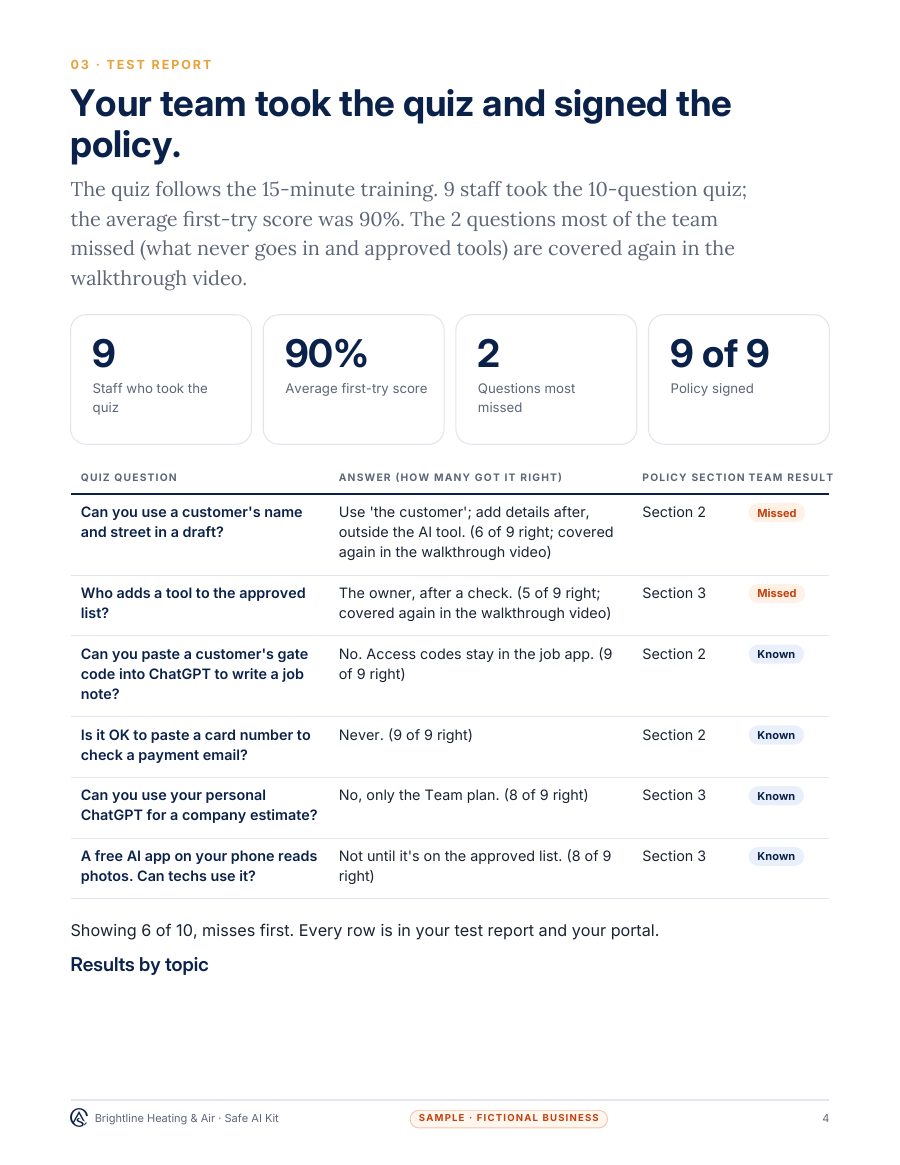
  • Staff quiz and sign-off: A 10-question staff quiz after the training, and a sign-off tracker showing who has read and signed the policy, with every score.
  • A one-page ownership and access sheet: every account, who owns it, and every file
  • A 30-day results report from your own logs
  • A 10-minute team walkthrough guide, and an "Ask it this" card with 10 starter questions for staff

What you still do yourself

  • Fill in a short setup form about your tools and the information you handle
  • Review the policy and ask for changes
  • Have each person watch the walkthrough, take the quiz and sign
Buy now: AI Policy & Staff Training: Done-For-You Setup

Pay online, then fill in a short setup form we email you; there's no discovery call. If your answers show we can't deliver, we refund you before any work starts.

Questions first? Text us or email us.

Before you buy

Your own tool costs

What you pay other providers, in your own accounts, whichever way you buy. None of it is paid to us.

ToolTypical cost
The AI tools your team already usesNo new tools needed. Business plans with data controls are recommended, about $20–30 per user a month

Approximate vendor prices as of November 2026; check each provider's current price. These are paid to them, never to us.

See what you get

A sample deliverable

A sample pack, so you can see the format before you buy. Your own pack uses your business, your tools and your results.

Sample

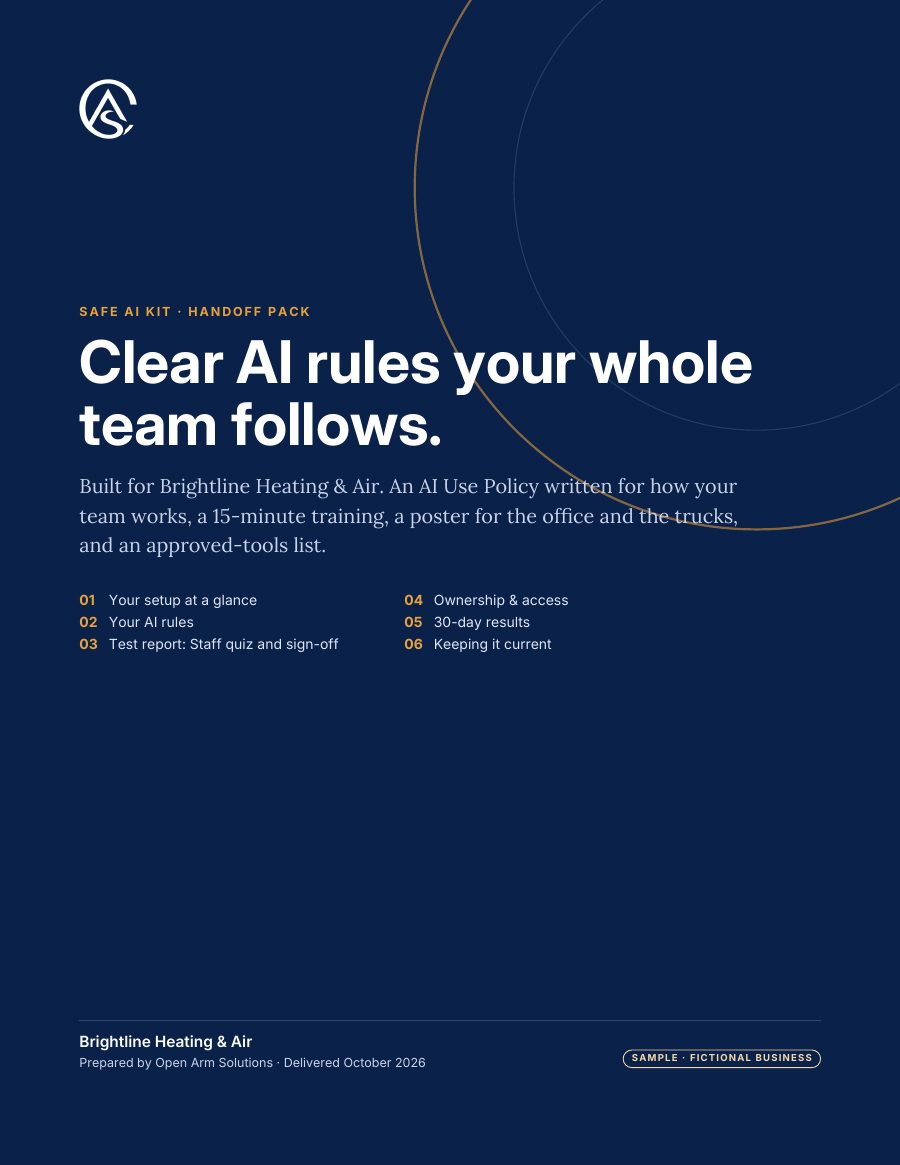
  • Sample handoff pack, page 1: cover
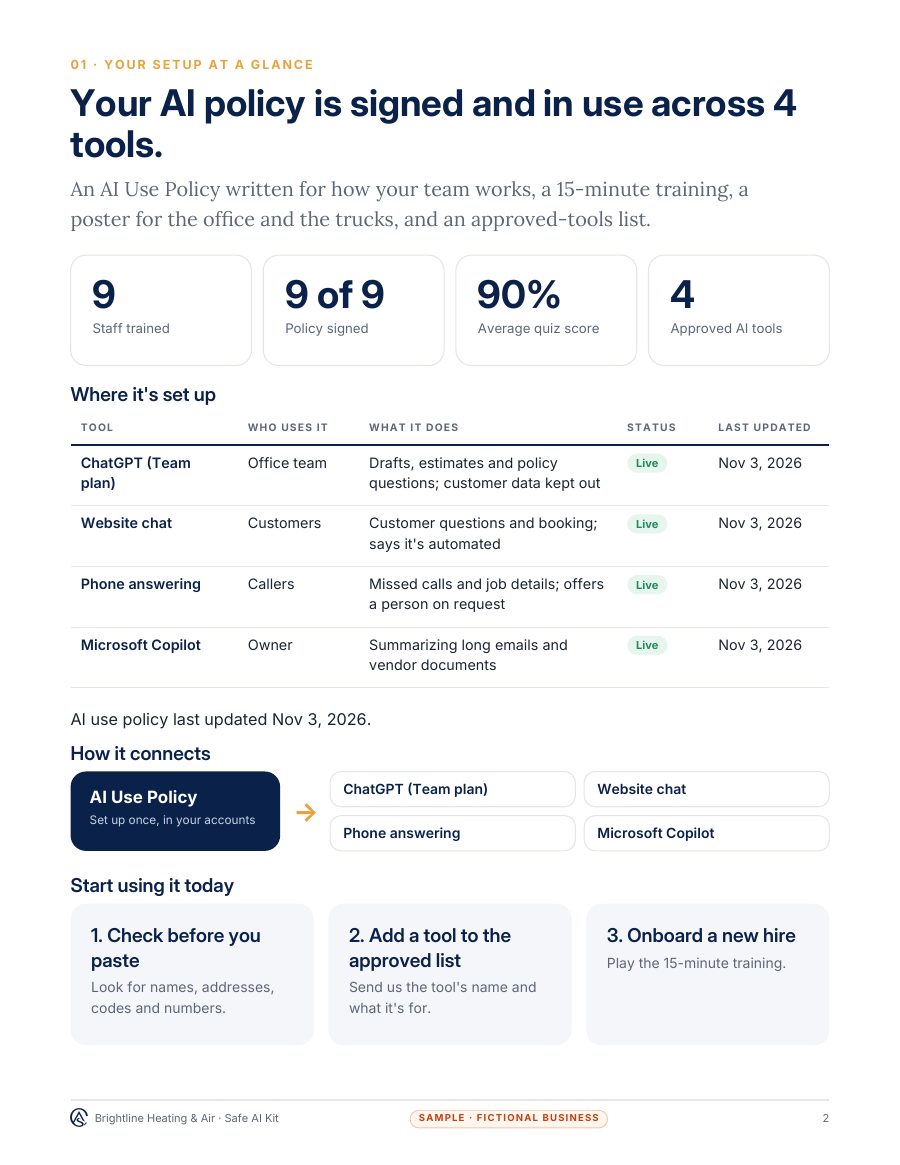
  • Sample handoff pack, page 2: setup at a glance
  • Sample handoff pack, page 3: Staff quiz and sign-off

The proof in every Done-For-You Setup: A 10-question staff quiz after the training, and a sign-off tracker showing who has read and signed the policy, with every score.

Try it

See how it works

A live demo with a sample business. Nothing you type is kept.

Live demo

Stop client data leaking into ChatGPT

Paste Check

Paste what you're about to put into ChatGPT. It finds names, SSNs, card and bank numbers, birth dates and passwords, and gives you a safe version.

  • Spots private data before you paste
  • Your original text never leaves your browser
Get this for my business: Paste Check

Fitted to your business

AI Policy & Staff Training for your kind of business

  • Home care agencies

    Your policy covers client health details, caregiver notes and photos, and which tools are allowed on personal phones.

  • Professional offices

    With Done-For-You Setup, tax offices get a policy written to sit alongside their Safeguards Rule security plan; law firms get one written around ABA Formal Opinion 512 and their state bar's guidance.

  • Health and wellness clinics

    Your policy keeps patient details out of public AI tools and says which tools staff may use, for what.

Questions

Before you buy

DIY Setup Guide or Done-For-You Setup: which should I choose?

The DIY Setup Guide suits a small team with simple tools that's happy to fill it in. Choose Done-For-You Setup if you handle sensitive information or answer to rules such as HIPAA or the FTC Safeguards Rule: we write it around your tools and data, with a narrated walkthrough video and a staff quiz for your team.

Is this legal advice?

No. It's a practical set of AI-use rules for your team. If you answer to a regulator, your own compliance lead or lawyer decides how it applies to you.

How long is the training?

About 15 minutes to read or listen to, with five real situations. Each person signs the sheet when they've done it.

Does it cover ChatGPT, Copilot and Gemini?

Yes. The approved-tools list has a line for each tool you allow, the account to use, and what it's approved for.

Is there a free version?

Yes: our free one-page AI Use Policy template. The DIY Setup Guide adds the training, the poster and the tools list, and Done-For-You Setup writes it for you.

After it's set up

Monthly Management, From $350/mo

We keep it updated, fix problems and check it every month. One monthly plan for everything we set up: kept current when your prices or services change, fixed when something breaks, and checked every month.

$350/mo covers one product we set up. Several, or weekly Google posts and review replies, are quoted in writing before you start.

See every price, and Monthly Management